Résumé rapide : La transformation numérique des flux documentaires convertit les processus manuels sur papier en systèmes numériques automatisés qui améliorent considérablement l'efficacité, réduisent les erreurs et garantissent la conformité. Les organisations qui mettent en œuvre des flux documentaires automatisés constatent généralement des réductions 70-80% du temps d'inactivité des documents et une baisse significative des coûts opérationnels. Les solutions modernes combinent la capture intelligente, le routage automatisé, l'extraction de données alimentée par l'IA et une sécurité robuste pour transformer la façon dont les documents circulent dans l'entreprise.
La manipulation manuelle des documents reste l'un des plus grands gouffres de productivité dans les organisations modernes. Les dossiers papier sont égarés. Les processus d'approbation sont bloqués dans la boîte de réception de quelqu'un. Les équipes perdent des heures à rechercher des informations qui devraient être accessibles instantanément.
Cela vous rappelle quelque chose ?
Le passage à des flux de documents numériques ne consiste pas seulement à éliminer le papier, mais aussi à revoir fondamentalement la façon dont l'information circule dans une organisation. Et les résultats parlent d'eux-mêmes.
Pourquoi la transformation du flux de documents est importante aujourd'hui
Selon l'AIIM, les systèmes de gestion de documents stockent, gèrent et suivent les documents électroniques et les images électroniques d'informations sur papier capturées par des scanners de documents. Mais voilà : la gestion traditionnelle des documents ne fait qu'effleurer les possibilités offertes par l'automatisation moderne des flux de travail.
Une étude citée par IDC a montré que les organisations les plus avancées en matière de numérisation avaient une avance de 45% sur les revenus par rapport à celles qui étaient à la traîne. Il ne s'agit pas d'une amélioration marginale. Il s'agit d'un gouffre concurrentiel.
Les données de Forrester montrent que 72% des personnes interrogées ont signalé des problèmes d'oubli ou de perte de documents dans les flux de travail traditionnels. Chaque document manquant représente une perte de temps, des décisions retardées et des employés frustrés.
La crise du flux de documents dans les organisations traditionnelles
La plupart des entreprises fonctionnent encore avec des systèmes hybrides qui créent des goulets d'étranglement partout. Les documents papier arrivent et nécessitent une saisie manuelle des données. Les fichiers numériques sont stockés dans des lecteurs partagés sans routage clair ni contrôle de version. Les processus d'approbation reposent sur des chaînes de courrier électronique dont il est impossible d'assurer le suivi.
Le coût cumulé ? Les entreprises consacrent d'innombrables heures à des tâches qu'une automatisation intelligente pourrait traiter en quelques secondes.
Les flux de documents manuels souffrent de points d'échec prévisibles :
- Les documents restent dans les files d'attente en attendant l'attention d'une personne.
- Les conventions de dénomination incohérentes rendent la recherche presque impossible.
- Il n'existe pas de pistes d'audit permettant de savoir qui a accédé à quoi ou l'a modifié.
- Les risques de non-conformité se multiplient à mesure que les réglementations se durcissent
- Le partage incontrôlé de documents est à l'origine de vulnérabilités en matière de sécurité
Il ne s'agit pas d'inconvénients mineurs. Il s'agit de problèmes structurels fondamentaux auxquels l'automatisation s'attaque directement.
Composants essentiels des flux de documents numériques
Pour transformer les flux de documents, il faut comprendre les technologies et les processus clés qui rendent l'automatisation efficace. Chaque composant joue un rôle spécifique dans la création d'un traitement transparent et intelligent des documents.
Capture intelligente de documents
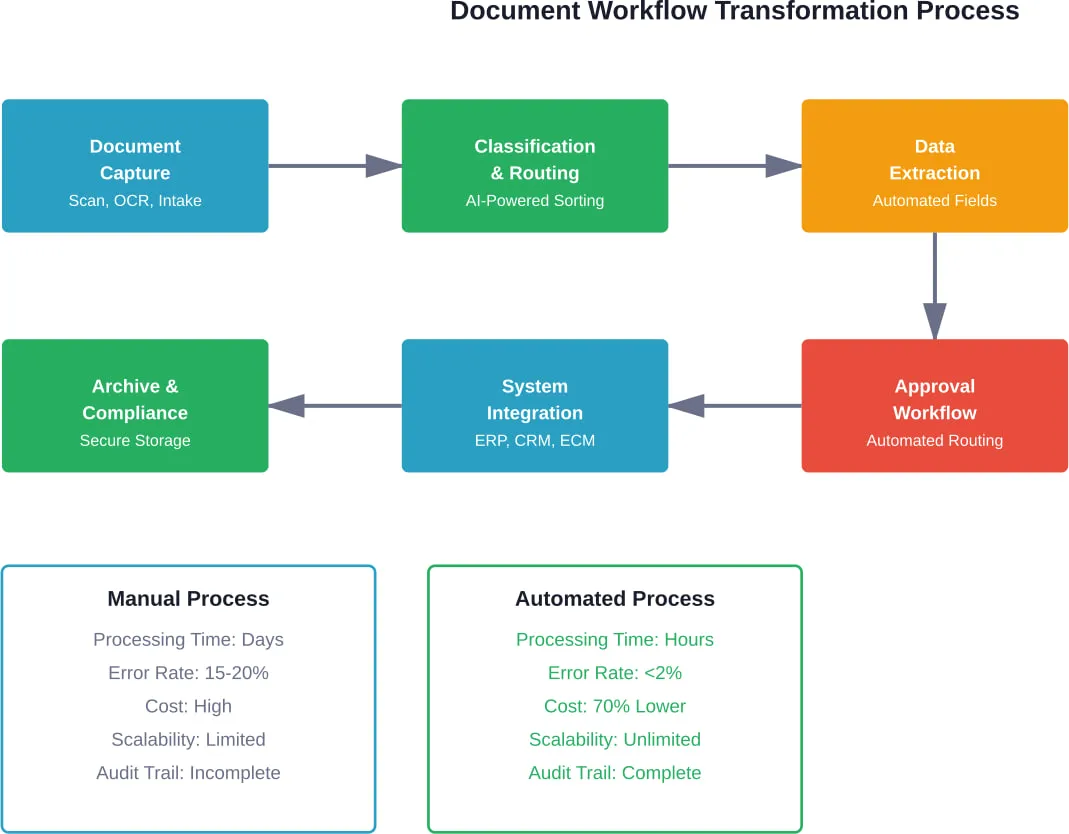
La capture moderne va bien au-delà de la simple numérisation. Les systèmes intelligents reconnaissent automatiquement les types de documents, extraient les données pertinentes et valident les informations par rapport aux règles de l'entreprise, le tout sans intervention manuelle.
Les organisations qui mettent en œuvre une classification et un routage automatisés signalent généralement une réduction de 70-80% du temps d'inactivité des documents. C'est la différence entre des documents qui restent inactifs pendant des jours et des documents qui traversent les chaînes d'approbation en quelques heures.
Les systèmes de capture avancés gèrent des sources d'entrée multiples : papier numérisé, pièces jointes aux courriels, formulaires web, téléchargements mobiles. Le système traite tout par le biais de flux de travail unifiés, quelle que soit l'origine.
Classification automatisée du contenu et routage
Une fois capturés, les documents doivent parvenir aux bonnes personnes au bon moment. Les systèmes de routage automatisés analysent le contenu, identifient les types de documents et envoient les fichiers aux flux de travail appropriés sans tri manuel.
C'est là que les choses deviennent intéressantes. Le routage intelligent ne se contente pas de suivre des règles statiques, il apprend à partir de modèles. Le système reconnaît que les factures de certains fournisseurs nécessitent des niveaux d'approbation particuliers. Les modifications de contrat sont automatiquement soumises à un examen juridique sur la base de la détection des clauses.
Ces systèmes de routage intelligents réduisent considérablement le temps d'attente des documents, remédiant ainsi à l'une des inefficacités les plus importantes des flux de documents traditionnels.
Extraction et validation des données par l'IA
L'extraction de données à partir de documents nécessitait autrefois des armées d'employés chargés de la saisie des données. L'IA moderne change complètement cette équation.
Les solutions de traitement intelligent des documents combinent les capacités de l'IA pour révolutionner l'intégration et le traitement des documents. Selon l'étude de l'AIIM, ces solutions s'avèrent particulièrement utiles dans les secteurs des services financiers, de la banque, de l'assurance et de la santé - des secteurs où le volume de documents et les exigences de précision sont tous deux extraordinairement élevés.
La technologie reconnaît les champs dans divers formats de documents : factures, bons de commande, contrats, formulaires, reçus. Elle extrait les points de données pertinents et les valide par rapport aux règles de l'entreprise, en signalant les anomalies pour qu'elles fassent l'objet d'un examen humain.
En réalité, le système n'a pas besoin d'être parfait. Les meilleures pratiques recommandent d'automatiser 70-80% du traitement des documents d'une organisation tout en réservant l'intervention humaine experte pour le dernier 20%. Cet équilibre permet de maximiser l'efficacité tout en maintenant le contrôle de la qualité.
Des stratégies de mise en œuvre qui fonctionnent
Une transformation numérique réussie ne se fait pas du jour au lendemain. Les organisations qui s'empressent de remplacer tous les systèmes créent souvent plus de problèmes qu'elles n'en résolvent.
Commencer par des flux de travail à fort impact
Identifier les processus à forte intensité documentaire les plus pénibles : traitement des factures, gestion des contrats, intégration des employés, applications clients. Cibler un ou deux flux de travail dans un premier temps plutôt que de tenter une transformation simultanée à l'échelle de l'entreprise.
Les gains rapides créent une dynamique. Lorsque le service financier voit le temps de traitement des factures passer de quelques jours à quelques heures, les autres services commencent à poser des questions. Cette demande interne entraîne une adoption plus large, bien plus efficacement que les mandats imposés d'en haut.
S'intégrer aux systèmes existants
Les flux de documents ne sont pas isolés. L'étude de l'AIIM indique que les entreprises gèrent un nombre croissant de systèmes de contenu - CRM, ERP, plateformes de collaboration, applications sectorielles spécialisées.
Le défi ? La gestion de plusieurs systèmes entraîne des coûts supplémentaires en termes de licences, de maintenance et d'assistance. Une transformation efficace du flux de travail nécessite une intégration qui relie les processus documentaires à ces systèmes d'entreprise existants.
Les plateformes de workflow modernes fournissent des API et des connecteurs qui relient les référentiels de documents aux applications d'entreprise. Lorsqu'une facture est approuvée dans le système de flux de travail, elle est automatiquement mise à jour dans l'ERP. L'achèvement de la signature d'un contrat déclenche la mise à jour des enregistrements CRM.
Ces intégrations éliminent le transfert manuel de données et garantissent la cohérence des informations entre les systèmes.
Donner la priorité à la sécurité et à la conformité dès le premier jour
La transformation numérique ne réduit pas les exigences de conformité - elle en accroît la visibilité. L'AIIM insiste sur le fait que les stratégies de conformité et d'archivage doivent commencer dès le début, et non pas après coup.
Les flux de travail automatisés créent des pistes d'audit complètes indiquant qui a accédé aux documents, quelles modifications ont été apportées et quand les approbations ont eu lieu. Les politiques de conservation permettent d'archiver ou de purger automatiquement les documents en fonction des exigences réglementaires.
Les contrôles de sécurité précisent exactement qui peut consulter, modifier ou partager des documents sensibles. Le cryptage protège les données en transit et au repos. Le contrôle des versions empêche les écrasements accidentels ou les modifications non autorisées.
| Composant de sécurité | Risque lié au flux de travail manuel | Protection automatisée des flux de travail |
|---|---|---|
| Contrôle d'accès | Partage de documents non tracés | Autorisations basées sur les rôles avec journaux d'audit |
| Gestion des versions | Plusieurs copies contradictoires | Source unique de vérité avec historique des versions |
| Cryptage des données | Fichiers stockés en clair | Cryptage de bout en bout de tous les documents |
| Piste d'audit | Pas de visibilité sur l'historique des accès | Consignation complète de toutes les interactions avec les documents |
| Politique de conservation | Archivage et suppression manuels | Gestion automatisée du cycle de vie |
| Rapport de conformité | Compilation manuelle fastidieuse | Rapports instantanés avec documentation complète |
Repensez le fonctionnement de vos flux documentaires
La transformation numérique est souvent réduite aux outils, mais dans les processus à forte densité de documents, le vrai problème est généralement la façon dont les systèmes et les flux de travail sont structurés. A-listware travaille avec les entreprises pour examiner comment les opérations se déroulent aujourd'hui, identifier les lacunes entre les systèmes et remodeler les processus afin que les documents circulent sans manipulation manuelle constante ou duplication.
Ils couvrent l'ensemble du cycle - de l'évaluation de la configuration actuelle et de la définition d'une approche de transformation à la mise en œuvre et à l'assistance continue. Cela inclut la modernisation des systèmes existants, l'amélioration de l'intégration entre les outils et la cohérence du flux de données entre les équipes. Si votre configuration actuelle ralentit encore les gens, il est judicieux d'obtenir une vision claire et externe de ce qui est à l'origine de ce ralentissement. Logiciel de liste A et voir ce qui peut être simplifié.
Mesurer le succès : Des analyses qui comptent
Les initiatives de transformation numérique ont besoin de mesures concrètes. Des objectifs vagues tels que “améliorer l'efficacité” ne permettent pas d'obtenir un retour d'information exploitable.
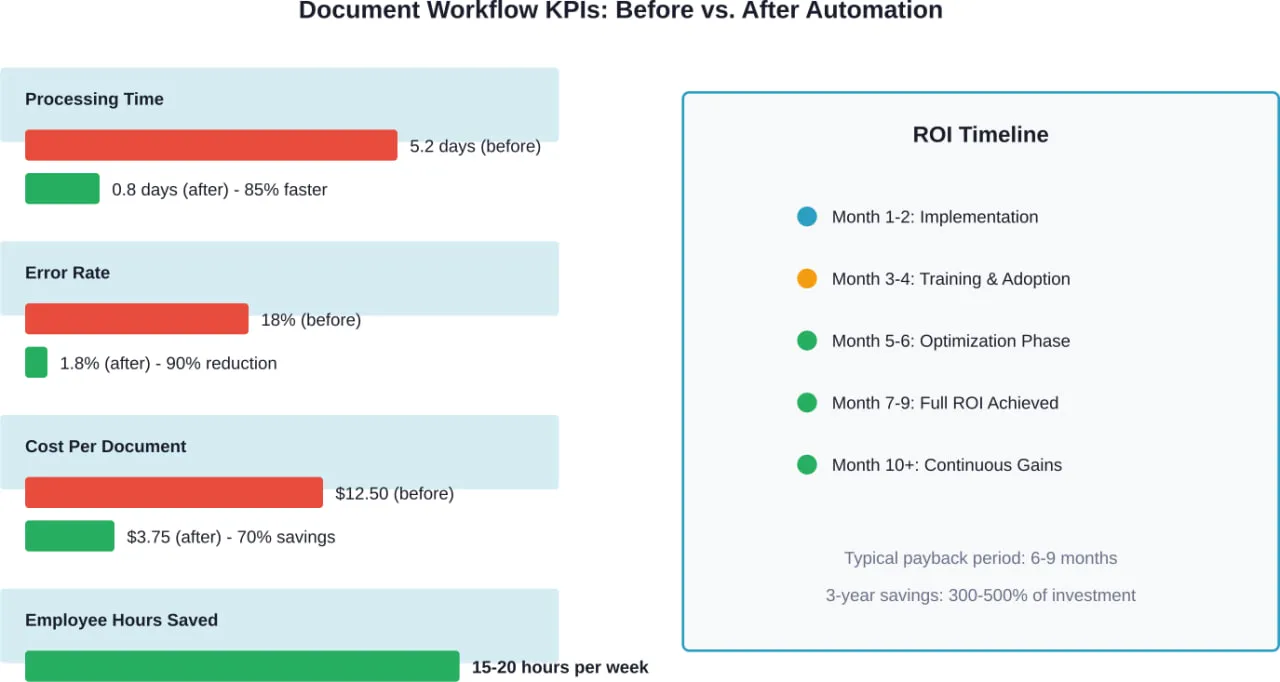
Les indicateurs clés de performance pour la transformation du flux de documents sont les suivants
- Temps moyen de traitement des documents, de la réception à l'achèvement
- Taux d'erreur dans l'extraction et l'acheminement des données
- Coût par document traité
- Temps consacré par les employés aux tâches liées aux documents
- Taux de réussite des audits de conformité
- Temps de récupération des documents en cas de besoin d'information
Les organisations devraient établir des mesures de référence avant l'automatisation, puis suivre les améliorations en continu. Les données révèlent quels flux de travail offrent le meilleur retour sur investissement et où les goulets d'étranglement persistent.
Mais attendez. Les mesures seules ne permettent pas d'améliorer les choses. Des sessions de révision régulières doivent permettre d'examiner les données et d'identifier les possibilités d'optimisation. Peut-être que certains types de documents nécessitent encore une intervention manuelle excessive. Les règles de routage doivent peut-être être affinées sur la base des schémas d'utilisation réels.
L'amélioration continue distingue les organisations qui obtiennent une valeur durable de celles qui mettent en œuvre l'automatisation une fois pour toutes.
Défis communs et comment les surmonter
La transformation numérique semble être une bonne chose en théorie. La réalité de la mise en œuvre apporte des obstacles prévisibles.
Résistance au changement
Les employés qui se sentent à l'aise avec les processus existants résistent souvent aux nouveaux systèmes, même lorsque ces systèmes faciliteraient leur travail. La solution n'est pas une meilleure technologie, mais une meilleure gestion du changement.
Impliquer les utilisateurs finaux dès le début du processus de sélection. Lorsque les utilisateurs se sentent écoutés et que leurs besoins sont pris en compte dans la solution finale, l'adoption de la solution s'améliore considérablement. Les sessions de formation doivent mettre l'accent sur les avantages plutôt que sur les fonctionnalités.
Complexité de l'intégration
Les systèmes hérités font rarement bon ménage avec les plateformes modernes. Les organisations sont confrontées à des choix : créer des intégrations personnalisées, utiliser des plates-formes intermédiaires ou remplacer entièrement les systèmes incompatibles.
La bonne réponse dépend des circonstances spécifiques. Les systèmes critiques dont le remplacement n'est pas prévu nécessitent des solutions d'intégration. Les plates-formes vieillissantes dont le remplacement est prévu ne justifient peut-être pas un investissement dans l'intégration.
Variabilité de la qualité des documents
L'extraction assistée par l'IA fonctionne parfaitement avec des documents propres et structurés. Elle a du mal avec les scans de mauvaise qualité, les notes manuscrites ou les formats incohérents.
La solution consiste à améliorer la qualité de la capture : meilleurs scanners, applications mobiles de capture avec contrôle de la qualité, formulaires numériques normalisés. Pour les documents qui restent problématiques, des approches hybrides permettent aux humains de gérer les exceptions tandis que l'automatisation traite les cas standard.
Le rôle de l'intelligence artificielle dans les flux de documents modernes
L'IA n'est pas un simple mot à la mode dans le domaine de l'automatisation des documents, c'est la technologie habilitante qui rend possible le traitement intelligent.
Une enquête menée par Keypoint Intelligence auprès des utilisateurs finaux montre que 95% des entreprises américaines explorent au moins l'IA pour les flux de documents et l'automatisation, en s'éloignant des tâches manuelles et des systèmes cloisonnés. L'objectif ? Rendre les flux de travail plus intelligents, plus rapides et plus sûrs.
Les modèles d'apprentissage automatique s'améliorent continuellement au fur et à mesure qu'ils traitent un plus grand nombre de documents. Le système qui, au départ, nécessite des corrections humaines fréquentes, traite progressivement les cas particuliers de manière autonome. La reconnaissance des formes permet d'identifier des anomalies qui pourraient échapper à l'homme : factures en double, schémas d'approbation suspects, violations de la conformité.
Le traitement du langage naturel permet d'extraire le sens d'un texte non structuré. Le système ne se contente pas de lire les clauses des contrats ; il comprend leurs implications pour les dates de renouvellement, les conditions de paiement et l'exposition à la responsabilité.
Mais voici le point essentiel : L'IA complète la prise de décision humaine et ne la remplace pas. La technologie se charge de la classification répétitive, de l'extraction des données et de l'acheminement. Les humains se concentrent sur les exceptions, les décisions stratégiques et la résolution de problèmes complexes nécessitant un jugement.
Applications spécifiques à l'industrie
La transformation des flux documentaires varie d'un secteur à l'autre en fonction des exigences spécifiques et de l'environnement réglementaire.
Services financiers et bancaires
Les banques traitent d'énormes volumes de documents : demandes de prêt, ouvertures de compte, déclarations de conformité, enregistrements de transactions. Les flux de travail automatisés accélèrent l'accueil des clients tout en maintenant des normes de conformité rigoureuses.
Les contrôles de lutte contre le blanchiment d'argent, la vérification de la connaissance du client et l'évaluation du crédit bénéficient tous d'un traitement intelligent des documents qui extrait les données et les valide dans plusieurs bases de données simultanément.
Soins de santé
Les organismes de soins de santé sont confrontés à des défis uniques pour concilier l'accessibilité et la confidentialité. Les dossiers des patients doivent être instantanément disponibles pour les prestataires autorisés tout en restant totalement sécurisés contre les accès non autorisés.
L'automatisation des flux de travail permet de gérer la documentation clinique, la vérification des assurances, le traitement des demandes de remboursement et les rapports réglementaires. La technologie garantit la conformité avec les exigences HIPAA tout en améliorant la coordination des soins.
Juridique
Les cabinets d'avocats gèrent les documents d'enquête, les contrats, les dossiers et les communications avec les clients. La recherche intelligente et la classification automatisée aident les avocats à trouver les précédents pertinents et les documents d'appui dans des référentiels documentaires massifs.
Les outils d'analyse des contrats permettent d'identifier les clauses clés, de repérer les risques potentiels et de suivre les obligations dans des milliers d'accords - un travail qui nécessiterait des armées d'associés juniors utilisant des méthodes traditionnelles.
Construire une feuille de route pour la transformation du flux de documents
La planification stratégique détermine si les initiatives de transformation apportent de la valeur ou créent des perturbations coûteuses.
Les organisations devraient adopter une approche progressive :
- Évaluation : Documenter les flux de travail actuels, identifier les points problématiques et mesurer les performances de base.
- Établissement de priorités : Classer les flux de travail en fonction de leur impact potentiel et de la complexité de leur mise en œuvre
- Preuve de concept : Mettre en œuvre l'automatisation d'un flux de travail à fort impact pour en démontrer la valeur
- Expansion : Appliquer l'automatisation à d'autres flux de travail sur la base des enseignements tirés.
- Optimisation : Améliorer en permanence les processus en utilisant les analyses et le retour d'information des utilisateurs.
- L'innovation : Explorer les capacités émergentes telles que l'IA avancée et l'analyse prédictive.
Le délai varie en fonction de la taille et de la complexité de l'organisation. Les petites et moyennes entreprises peuvent achever la mise en œuvre initiale en 3 à 6 mois. Les déploiements d'entreprises couvrant plusieurs départements et zones géographiques nécessitent souvent 12 à 18 mois pour une transformation complète.
Tendances futures de la technologie du flux de documents
L'évolution technologique ne s'arrête jamais. Plusieurs tendances émergentes vont remodeler les flux de documents au cours des prochaines années.
Les modèles d'IA avancés traiteront des documents de plus en plus complexes avec une formation minimale. Les capacités d'apprentissage zéro permettent aux systèmes de traiter de nouveaux types de documents sans avoir besoin d'un grand nombre d'exemples.
L'intégration de la blockchain fournit des pistes d'audit immuables pour les flux de travail critiques en matière de conformité. Les contrats intelligents exécutent automatiquement les actions déclenchées par les documents lorsque les conditions sont remplies.
Le traitement en périphérie permet la capture de documents et le traitement initial sur des appareils mobiles avant que les données n'atteignent les systèmes centraux, ce qui améliore la vitesse tout en réduisant les besoins en bande passante.
Les analyses prédictives anticipent les goulets d'étranglement du flux de travail et les besoins en ressources avant qu'ils ne deviennent des problèmes. Le système propose un routage optimal basé sur la distribution actuelle de la charge de travail et sur des modèles historiques.
Questions fréquemment posées
- Quel est le délai de retour sur investissement typique pour l'automatisation des flux documentaires ?
La plupart des organisations constatent un retour sur investissement positif dans les 6 à 9 mois suivant la mise en œuvre. Les avantages initiaux proviennent de la réduction du temps de traitement et des taux d'erreur. Les gains à long terme découlent de l'amélioration de la conformité, de l'amélioration de la prise de décision et de la libération des capacités des employés pour des tâches à plus forte valeur ajoutée. Les économies réalisées sur trois ans atteignent généralement 300-500% des coûts d'investissement initiaux.
- Les petites entreprises peuvent-elles bénéficier de l'automatisation des flux documentaires ou celle-ci est-elle réservée aux grandes entreprises ?
Les petites entreprises bénéficient souvent d'avantages proportionnellement plus importants, car le traitement manuel des documents représente un pourcentage plus élevé du temps total du personnel. Les solutions modernes basées sur le cloud offrent des points d'entrée abordables sans investissement majeur dans l'infrastructure. Commencer par un seul flux de travail, comme le traitement des factures ou l'accueil des clients, permet de démontrer la valeur de la solution avant de l'étendre à d'autres processus.
- Comment le traitement automatisé des documents traite-t-il les exceptions et les cas inhabituels ?
Les systèmes intelligents transmettent les exceptions aux réviseurs humains en fonction de seuils de confiance. Lorsque l'IA rencontre un type de document qu'elle ne reconnaît pas ou des données qui ne sont pas validées correctement, elle signale l'élément pour qu'il soit examiné manuellement plutôt que de forcer une décision potentiellement incorrecte. Les meilleures pratiques recommandent d'automatiser 70-80% du traitement des documents d'une organisation et de réserver l'expertise humaine aux 20% situations complexes restantes.
- Quelles mesures de sécurité protègent les documents sensibles dans les flux de travail automatisés ?
Les plateformes de flux de travail modernes mettent en œuvre plusieurs couches de sécurité : cryptage de bout en bout des données en transit et au repos, contrôles d'accès basés sur les rôles limitant les personnes autorisées à consulter ou à modifier des types de documents spécifiques, pistes d'audit complètes retraçant tous les accès et toutes les modifications, et politiques de conservation automatisées garantissant que les documents sont archivés ou purgés conformément aux exigences réglementaires. Ces contrôles dépassent souvent la sécurité possible avec des flux de travail numériques manuels ou sur papier.
- Est-il difficile d'intégrer l'automatisation du traitement des documents dans les systèmes d'entreprise existants ?
La complexité de l'intégration dépend des systèmes spécifiques impliqués. La plupart des plateformes de workflow modernes proposent des connecteurs prédéfinis pour les ERP, les CRM et les outils de collaboration les plus courants. Les systèmes hérités peuvent nécessiter le développement d'API personnalisées ou de solutions middleware. Les organisations doivent évaluer les exigences d'intégration dès le début du processus de sélection et prendre en compte les efforts d'intégration dans les calendriers de mise en œuvre.
- Qu'advient-il des documents papier existants lors de la mise en œuvre de flux de travail numériques ?
En règle générale, les entreprises archivent les documents essentiels en les numérisant et en les indexant. La numérisation complète des archives n'est pas toujours nécessaire - de nombreuses entreprises mettent en œuvre des flux de travail numériques tournés vers l'avenir tout en conservant les archives papier existantes conformément aux calendriers de conservation. La priorité est donnée à la numérisation des documents fréquemment consultés et de ceux qui sont soumis à des exigences de conformité permanentes.
- Comment les employés réagissent-ils généralement à l'automatisation des flux de travail et comment les entreprises peuvent-elles encourager leur adoption ?
La résistance initiale est fréquente, en particulier chez les employés qui ont acquis une expertise des processus existants. Pour réussir l'adoption, il faut impliquer les utilisateurs finaux dans la sélection du système, fournir une formation complète axée sur les avantages plutôt que sur les fonctionnalités, commencer par les flux de travail les plus pénibles où les améliorations sont immédiatement évidentes, et célébrer les premières victoires pour créer une dynamique. Lorsque les employés constatent que l'automatisation élimine les tâches frustrantes, l'adoption s'accélère naturellement.
Faire le premier pas vers la transformation
La transformation numérique des flux documentaires n'est pas un projet unique avec une finalité définie. Il s'agit d'une évolution permanente vers une gestion de l'information plus efficace, plus sûre et plus intelligente.
Les organisations qui prospèrent n'attendent pas de solutions parfaites ou de certitude totale. Elles commencent par un flux de travail, tirent des enseignements de la mise en œuvre et étendent systématiquement leurs activités en fonction des résultats obtenus.
Les données montrent régulièrement que les organisations qui mettent en œuvre une classification et un routage automatisés enregistrent généralement une réduction de 70 à 80% du temps d'inactivité des documents en attente d'attention, des taux d'erreur nettement inférieurs et des économies substantielles. Les organisations plus avancées en matière de numérisation affichent un avantage de 45% en termes de revenus par rapport à celles qui sont à la traîne.
Ces chiffres représentent un véritable avantage concurrentiel sur des marchés où l'efficacité et l'agilité déterminent le succès.
La question n'est pas de savoir s'il faut transformer les flux de documents. Il s'agit de savoir s'il faut commencer maintenant ou regarder les concurrents prendre de l'avance pendant que votre organisation continue à se débattre avec des processus manuels qui font perdre du temps, de l'argent et du potentiel aux employés.
Commencez par identifier un flux de travail à forte intensité documentaire qui crée des difficultés considérables dans votre entreprise. Cartographiez le processus actuel, mesurez les performances de base et explorez les solutions d'automatisation conçues pour ce cas d'utilisation spécifique.
Cette transformation unique du flux de travail fournit la preuve du concept, renforce la confiance de l'organisation et crée un élan pour un changement plus large. La technologie fonctionne. L'analyse de rentabilité est claire. Ce qu'il faut, c'est s'engager à faire le premier pas.


