Короткий виклад: Digital transformation for document workflows converts manual paper-based processes into automated digital systems that dramatically improve efficiency, reduce errors, and ensure compliance. Organizations implementing automated document workflows typically see 70-80% reductions in document idle time and significantly lower operational costs. Modern solutions combine intelligent capture, automated routing, AI-powered data extraction, and robust security to transform how documents move through an enterprise.
Manual document handling remains one of the most persistent productivity drains in modern organizations. Paper files get misplaced. Approval processes stall in someone’s inbox. Teams waste hours searching for information that should be instantly accessible.
Sound familiar?
The shift toward digital document workflows isn’t just about eliminating paper—it’s about fundamentally redesigning how information moves through an organization. And the results speak for themselves.
Why Document Workflow Transformation Matters Now
According to AIIM, document management systems store, manage, and track electronic documents and electronic images of paper-based information captured through document scanners. But here’s the thing: traditional document management barely scratches the surface of what’s possible with modern workflow automation.
Research cited by IDC found that organizations further ahead on digitization were 45% ahead on revenues compared to those lagging behind. That’s not a marginal improvement. That’s a competitive chasm.
Forrester data shows that 72% of respondents reported issues with documents getting forgotten or lost in traditional workflows. Every missing document represents wasted time, delayed decisions, and frustrated employees.
The Document Workflow Crisis in Traditional Organizations
Most businesses still operate with hybrid systems that create bottlenecks everywhere. Paper documents arrive and need manual data entry. Digital files sit in shared drives with no clear routing or version control. Approval processes rely on email chains that become impossible to track.
The cumulative cost? Organizations spend countless hours on tasks that intelligent automation could handle in seconds.
Manual document workflows suffer from predictable failure points:
- Documents idle in queues waiting for human attention
- Inconsistent naming conventions make retrieval nearly impossible
- No audit trails exist to track who accessed or modified what
- Compliance risks multiply as regulations tighten
- Security vulnerabilities emerge from uncontrolled document sharing
These aren’t minor inconveniences. They’re fundamental structural problems that automation directly addresses.
Core Components of Digital Document Workflows
Transforming document workflows requires understanding the key technologies and processes that make automation effective. Each component plays a specific role in creating seamless, intelligent document handling.
Intelligent Document Capture
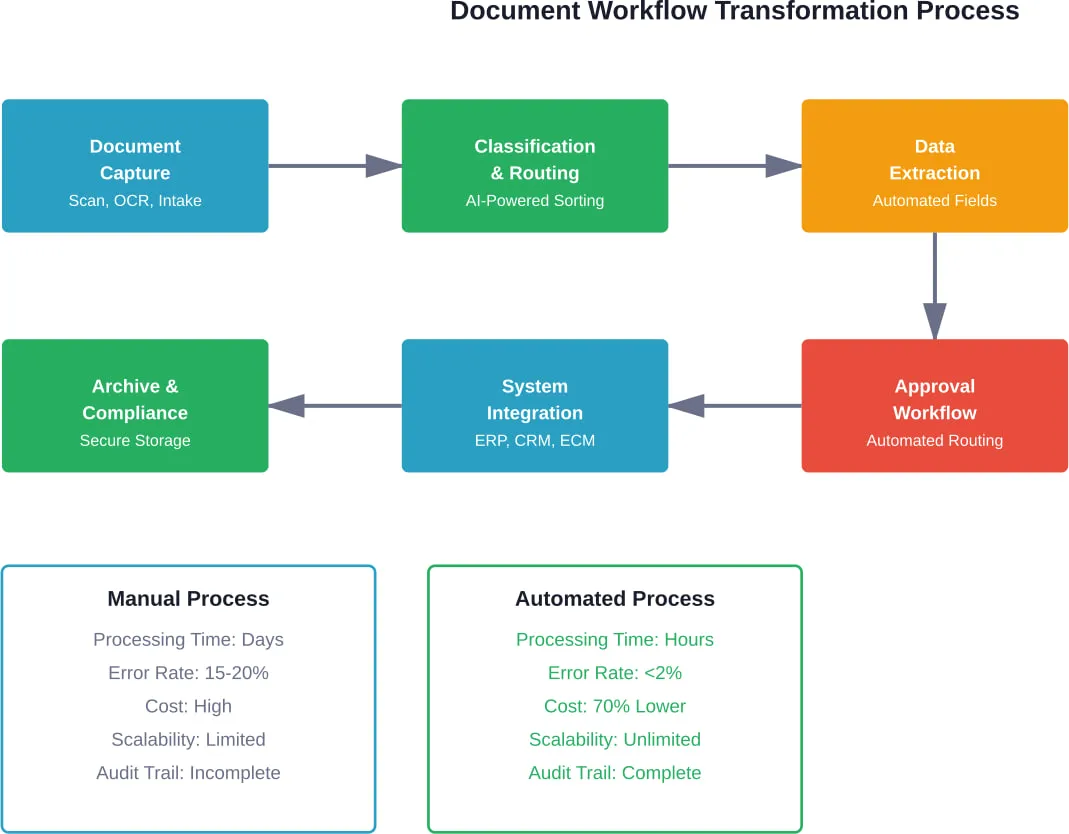
Modern capture goes far beyond basic scanning. Intelligent systems recognize document types automatically, extract relevant data, and validate information against business rules—all without manual intervention.
Organizations implementing automated classification and routing typically report 70-80% reductions in document idle time. That’s the difference between documents sitting idle for days versus flowing through approval chains in hours.
Advanced capture systems handle multiple input sources: scanned paper, email attachments, web forms, mobile uploads. The system processes everything through unified workflows regardless of origin.
Automated Content Classification and Routing
Once captured, documents need to reach the right people at the right time. Automated routing systems analyze content, identify document types, and send files to appropriate workflows without manual sorting.
Here’s where things get interesting. Intelligent routing doesn’t just follow static rules—it learns from patterns. The system recognizes that invoices from specific vendors need particular approval levels. Contract amendments automatically route to legal review based on clause detection.
These intelligent routing systems dramatically reduce the idle time documents spend waiting for attention, addressing one of the most significant inefficiencies in traditional document workflows.
AI-Powered Data Extraction and Validation
Extracting data from documents used to require armies of data entry clerks. Modern AI changes that equation completely.
Intelligent document processing solutions combine AI capabilities to revolutionize document onboarding and processing. According to AIIM research, these solutions prove particularly useful in financial services, banking, insurance, and healthcare industries—sectors where document volume and accuracy requirements are both extraordinarily high.
The technology recognizes fields across varied document formats: invoices, purchase orders, contracts, forms, receipts. It extracts relevant data points and validates them against business rules, flagging anomalies for human review.
Real talk: the system doesn’t need to be perfect. Best practices recommend automating 70-80% of an organization’s document handling while reserving expert human intervention for the final 20%. That balance maximizes efficiency while maintaining quality control.
Implementation Strategies That Actually Work
Successful digital transformation doesn’t happen overnight. Organizations that rush into wholesale system replacements often create more problems than they solve.
Start With High-Impact Workflows
Identify document-intensive processes that create the most pain: invoice processing, contract management, employee onboarding, customer applications. Target one or two workflows initially rather than attempting enterprise-wide transformation simultaneously.
Quick wins build momentum. When finance sees invoice processing time drop from days to hours, other departments start asking questions. That internal demand drives broader adoption far more effectively than top-down mandates.
Integrate With Existing Systems
Document workflows don’t exist in isolation. AIIM research indicates organizations manage increasing numbers of content systems—CRMs, ERPs, collaboration platforms, specialized industry applications.
The challenge? Managing multiple systems incurs additional costs for licensing, maintenance, and support. Effective workflow transformation requires integration that connects document processes to these existing business systems.
Modern workflow platforms provide APIs and connectors that link document repositories with enterprise applications. When an invoice gets approved in the workflow system, it automatically updates the ERP. Contract signature completion triggers CRM record updates.
These integrations eliminate manual data transfer and ensure information consistency across systems.
Prioritize Security and Compliance From Day One
Digital transformation doesn’t reduce compliance requirements—it increases visibility into them. AIIM emphasizes that compliance and archiving strategies must begin at the beginning, not as afterthoughts.
Automated workflows create complete audit trails showing who accessed documents, what changes occurred, and when approvals happened. Retention policies automatically archive or purge documents based on regulatory requirements.
Security controls specify exactly who can view, edit, or share sensitive documents. Encryption protects data in transit and at rest. Version control prevents accidental overwrites or unauthorized modifications.
| Компонент безпеки | Manual Workflow Risk | Automated Workflow Protection |
|---|---|---|
| Access Control | Untracked document sharing | Role-based permissions with audit logs |
| Version Management | Multiple conflicting copies | Single source of truth with version history |
| Шифрування даних | Files stored unencrypted | End-to-end encryption for all documents |
| Audit Trail | No visibility into access history | Complete logs of all document interactions |
| Retention Policy | Manual archiving and deletion | Automated lifecycle management |
| Звітність про комплаєнс | Time-consuming manual compilation | Instant reporting with complete documentation |
Rethink How Your Document Workflows Actually Work
Digital transformation often gets reduced to tools, but in document-heavy processes the real issue is usually how systems and workflows are structured. A-listware works with companies to review how operations run today, identify gaps between systems, and reshape processes so documents move without constant manual handling or duplication.
They cover the full cycle – from assessing the current setup and defining a transformation approach to implementation and ongoing support. That includes modernizing legacy systems, improving integration between tools, and making data flow more consistent across teams. If your current setup still slows people down, it makes sense to get a clear, external view of what’s actually causing it – reach out to Програмне забезпечення списку А and see what can be simplified.
Measuring Success: Analytics That Matter
Digital transformation initiatives need concrete metrics. Vague goals like “improve efficiency” don’t provide actionable feedback.
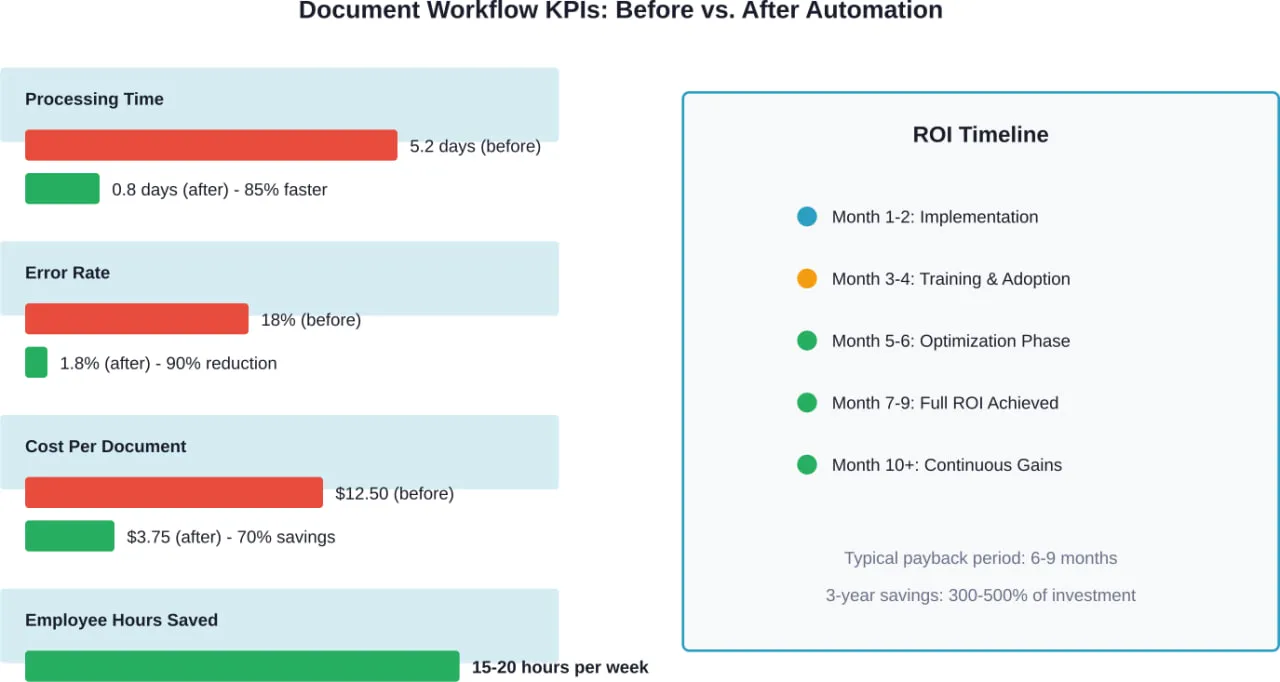
Key performance indicators for document workflow transformation include:
- Average document processing time from receipt to completion
- Error rates in data extraction and routing
- Cost per document processed
- Employee time spent on document-related tasks
- Compliance audit pass rates
- Document retrieval time when information is needed
Organizations should establish baseline measurements before automation, then track improvements continuously. The data reveals which workflows deliver the strongest ROI and where bottlenecks persist.
But wait. Metrics alone don’t drive improvement. Regular review sessions should examine the data and identify optimization opportunities. Maybe certain document types still require excessive manual intervention. Perhaps routing rules need refinement based on actual usage patterns.
Continuous improvement distinguishes organizations that achieve sustained value from those that implement automation once and move on.
Поширені проблеми та шляхи їх подолання
Digital transformation sounds great in theory. Implementation reality brings predictable obstacles.
Опір змінам
Employees comfortable with existing processes often resist new systems—even when those systems would make their jobs easier. The solution isn’t better technology; it’s better change management.
Involve end users early in the selection process. When people feel heard and see their requirements reflected in the final solution, adoption improves dramatically. Training sessions should emphasize benefits rather than just features.
Складність інтеграції
Legacy systems rarely play nicely with modern platforms. Organizations face choices: build custom integrations, use middleware platforms, or replace incompatible systems entirely.
The right answer depends on specific circumstances. Critical systems with no replacement timeline need integration solutions. Aging platforms scheduled for replacement might not justify integration investment.
Document Quality Variability
AI-powered extraction works brilliantly with clean, structured documents. It struggles with poor-quality scans, handwritten notes, or inconsistent formatting.
The fix involves improving capture quality—better scanners, mobile capture apps with quality checking, standardized digital forms. For documents that remain problematic, hybrid approaches let humans handle exceptions while automation processes standard cases.
The Role of Artificial Intelligence in Modern Document Workflows
AI isn’t just another buzzword in document automation—it’s the enabling technology that makes intelligent processing possible.
A Keypoint Intelligence end user survey shows that 95% of US businesses are at least exploring AI for document workflows and automation, moving away from manual tasks and siloed systems. The goal? Making workflows smarter, faster, and more secure.
Machine learning models improve continuously as they process more documents. The system that initially requires frequent human correction gradually handles edge cases independently. Pattern recognition identifies anomalies that humans might miss—duplicate invoices, suspicious approval patterns, compliance violations.
Natural language processing extracts meaning from unstructured text. The system doesn’t just read contract clauses; it understands their implications for renewal dates, payment terms, and liability exposure.
But here’s the critical point: AI augments human decision-making rather than replacing it. The technology handles repetitive classification, data extraction, and routing. Humans focus on exceptions, strategic decisions, and complex problem-solving that requires judgment.
Галузеві застосування
Document workflow transformation looks different across industries based on specific requirements and regulatory environments.
Financial Services and Banking
Banks process enormous document volumes: loan applications, account openings, compliance filings, transaction records. Automated workflows accelerate customer onboarding while maintaining rigorous compliance standards.
Anti-money laundering checks, know-your-customer verification, and credit assessment all benefit from intelligent document processing that extracts data and validates it against multiple databases simultaneously.
Охорона здоров'я
Healthcare organizations face unique challenges balancing accessibility with privacy. Patient records need to be instantly available to authorized providers while remaining completely secure from unauthorized access.
Workflow automation handles clinical documentation, insurance verification, claims processing, and regulatory reporting. The technology ensures compliance with HIPAA requirements while improving care coordination.
Legal
Law firms manage discovery documents, contracts, case files, and client communications. Intelligent search and automated classification help lawyers find relevant precedents and supporting documents in massive document repositories.
Contract analysis tools identify key clauses, flag potential risks, and track obligations across thousands of agreements—work that would require armies of junior associates using traditional methods.
Building a Roadmap for Document Workflow Transformation
Strategic planning determines whether transformation initiatives deliver value or create expensive disruption.
Organizations should follow a phased approach:
- Assessment: Document current workflows, identify pain points, and measure baseline performance metrics
- Prioritization: Rank workflows by potential impact and implementation complexity
- Proof of Concept: Implement automation for one high-impact workflow to demonstrate value
- Expansion: Roll out automation to additional workflows based on lessons learned
- Optimization: Continuously refine processes using analytics and user feedback
- Innovation: Explore emerging capabilities like advanced AI and predictive analytics
The timeline varies based on organizational size and complexity. Small to mid-size businesses might complete initial implementation in 3-6 months. Enterprise deployments spanning multiple departments and geographies often require 12-18 months for comprehensive transformation.
Future Trends in Document Workflow Technology
Technology evolution never stops. Several emerging trends will reshape document workflows over the next few years.
Advanced AI models will handle increasingly complex documents with minimal training. Zero-shot learning capabilities let systems process new document types without extensive example sets.
Blockchain integration provides immutable audit trails for compliance-critical workflows. Smart contracts automatically execute document-triggered actions when conditions are met.
Edge processing enables document capture and initial processing on mobile devices before data reaches central systems—improving speed while reducing bandwidth requirements.
Predictive analytics anticipate workflow bottlenecks and resource needs before they become problems. The system suggests optimal routing based on current workload distribution and historical patterns.
Поширені запитання
- What’s the typical ROI timeline for document workflow automation?
Most organizations see positive ROI within 6-9 months of implementation. Initial benefits come from reduced processing time and lower error rates. Longer-term gains accumulate from improved compliance, better decision-making, and freed employee capacity for higher-value work. Three-year savings typically reach 300-500% of initial investment costs.
- Can small businesses benefit from document workflow automation, or is it only for enterprises?
Small businesses often see proportionally larger benefits because manual document handling consumes a greater percentage of total staff time. Modern cloud-based solutions offer affordable entry points without major infrastructure investment. Starting with a single workflow like invoice processing or customer onboarding demonstrates value before expanding to additional processes.
- How does automated document processing handle exceptions and unusual cases?
Intelligent systems route exceptions to human reviewers based on confidence thresholds. When the AI encounters a document type it doesn’t recognize or data that doesn’t validate properly, it flags the item for manual review rather than forcing a potentially incorrect decision. Best practices recommend automating 70-80% of an organization’s document handling while reserving human expertise for the remaining 20% of complex situations.
- What security measures protect sensitive documents in automated workflows?
Modern workflow platforms implement multiple security layers: end-to-end encryption for data in transit and at rest, role-based access controls limiting who can view or edit specific document types, complete audit trails tracking all access and modifications, and automated retention policies ensuring documents are archived or purged according to regulatory requirements. These controls often exceed the security possible with paper-based or manual digital workflows.
- How difficult is it to integrate document workflow automation with existing business systems?
Integration complexity depends on the specific systems involved. Most modern workflow platforms provide pre-built connectors for popular ERP, CRM, and collaboration tools. Legacy systems may require custom API development or middleware solutions. Organizations should evaluate integration requirements early in the selection process and factor integration effort into implementation timelines.
- What happens to existing paper documents when implementing digital workflows?
Organizations typically backfile critical documents through scanning and indexing. Complete archive digitization isn’t always necessary—many businesses implement forward-looking digital workflows while maintaining legacy paper archives according to retention schedules. Prioritize digitizing frequently accessed documents and those with ongoing compliance requirements.
- How do employees typically respond to workflow automation, and how can organizations encourage adoption?
Initial resistance is common, especially among employees who’ve developed expertise with existing processes. Successful adoption requires involving end users in system selection, providing comprehensive training focused on benefits rather than just features, starting with high-pain workflows where improvements are immediately obvious, and celebrating early wins to build momentum. When employees see automation eliminating frustrating tasks, adoption accelerates naturally.
Перший крок до трансформації
Digital transformation for document workflows isn’t a single project with a defined endpoint. It’s an ongoing evolution toward more efficient, secure, and intelligent information management.
The organizations that thrive don’t wait for perfect solutions or complete certainty. They start with one workflow, learn from implementation, and expand systematically based on demonstrated results.
Data consistently shows that organizations implementing automated classification and routing typically report 70-80% reductions in idle time documents spent waiting for attention, dramatically lower error rates, and substantial cost savings. Organizations further ahead on digitization demonstrate 45% revenue advantages over those lagging behind.
Those numbers represent real competitive advantage in markets where efficiency and agility determine success.
The question isn’t whether to transform document workflows. It’s whether to start now or watch competitors pull ahead while your organization continues wrestling with manual processes that waste time, money, and employee potential.
Begin by identifying one document-intensive workflow creating significant pain in your organization. Map the current process, measure baseline performance, and explore automation solutions designed for that specific use case.
That single workflow transformation provides the proof of concept, builds organizational confidence, and creates momentum for broader change. The technology works. The business case is clear. What’s needed is commitment to take the first step.


